
Authentication
Every call to the SquadOS API is authenticated with an API token sent in the Authorization header, Bearer style. The token is prefixed with pk_ and is scoped to your organization — it grants access to that organization’s agents, conversations, and bases.
Authorization: Bearer pk_your_key_hereGenerating a token
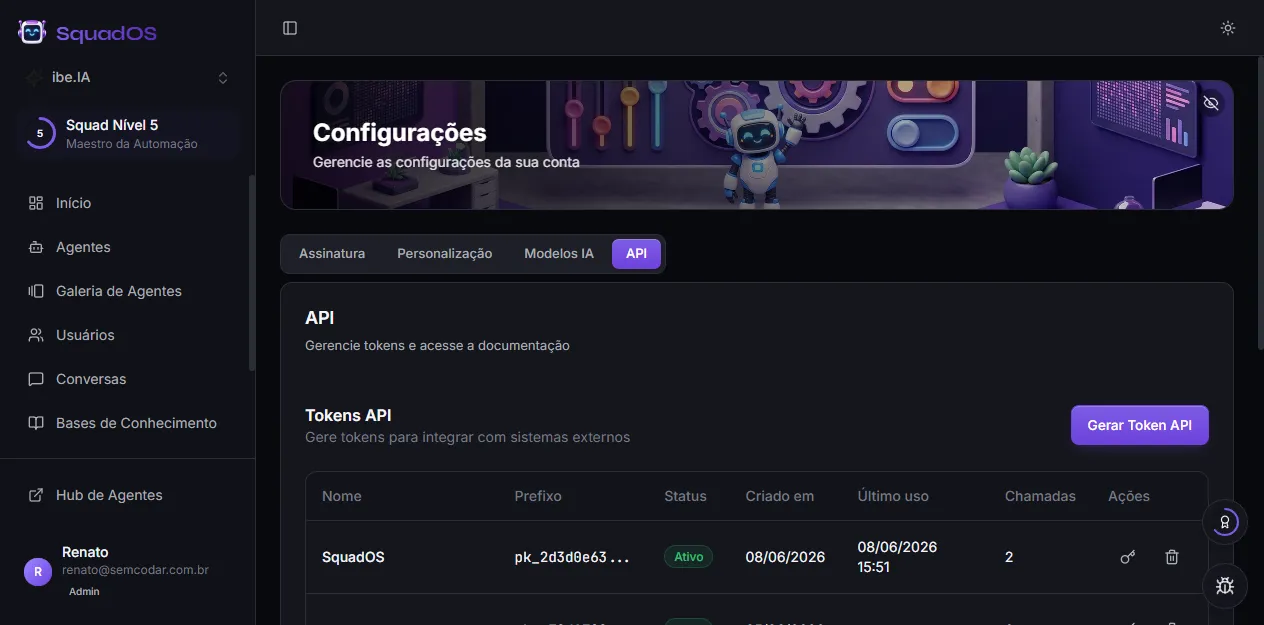
Section titled “Generating a token”Tokens are generated in the admin panel, under Settings → API.
-
In the admin panel, open Settings and select the API tab.
-
Click Generate API Token and give the token a name (e.g.
n8n production,internal backend) so you can identify it later. -
Copy the token right away. It is shown only once, right after creation. For security, SquadOS stores only a hash — there’s no way to retrieve the full value later. If you lose it, generate a new one.
Using the token
Section titled “Using the token”Include the Authorization header on every request. On calls with a body, also send Content-Type: application/json:
curl https://api.squados.io/v1/agents \ -H "Authorization: Bearer pk_your_key_here"curl -X POST https://api.squados.io/v1/chat/AGENT_ID \ -H "Authorization: Bearer pk_your_key_here" \ -H "Content-Type: application/json" \ -d '{ "message": "Hello!", "sync": true }'Managing tokens
Section titled “Managing tokens”In the same API tab, the table lists every token in the organization:
- Prefix — the first characters of the token (e.g.
pk_2d3d0e63...), so you can tell them apart without seeing the full value. - Status —
ActiveorRevoked. - Created and Last used — when it was generated and last used.
- Calls — how many requests it has made.
Each token has two actions:
- Revoke — disables the token immediately. Calls with it start returning
401. The record stays in the table (marked revoked) for auditing. - Delete — removes the token from the table for good.
Authentication errors
Section titled “Authentication errors”When the token is missing, malformed, revoked, or invalid, the API responds 401:
{ "error": "Invalid or missing API token", "code": "unauthorized"}Check that the header is in the exact form Authorization: Bearer pk_... (with the space after Bearer) and that the token hasn’t been revoked. See Errors for the full list of codes.