














Skip to content
SquadOS
Theme
Log in

SquadOS for business

Put AI agents to work with your team

Call agents into rooms, run meetings with minutes, and create images, videos and files with your whole team on one plan.

  • Unlimited users and agents
  • 15,000 credits a month
  • 7-day guarantee

What the demo shows:

  1. Someone asks for help planning the Aurora Iced launch; the agent researches 6 sources and replies with a three-phase plan and goals.
  2. In Images and videos, the person creates a photo of themselves holding a robot and a video of a hero scene.
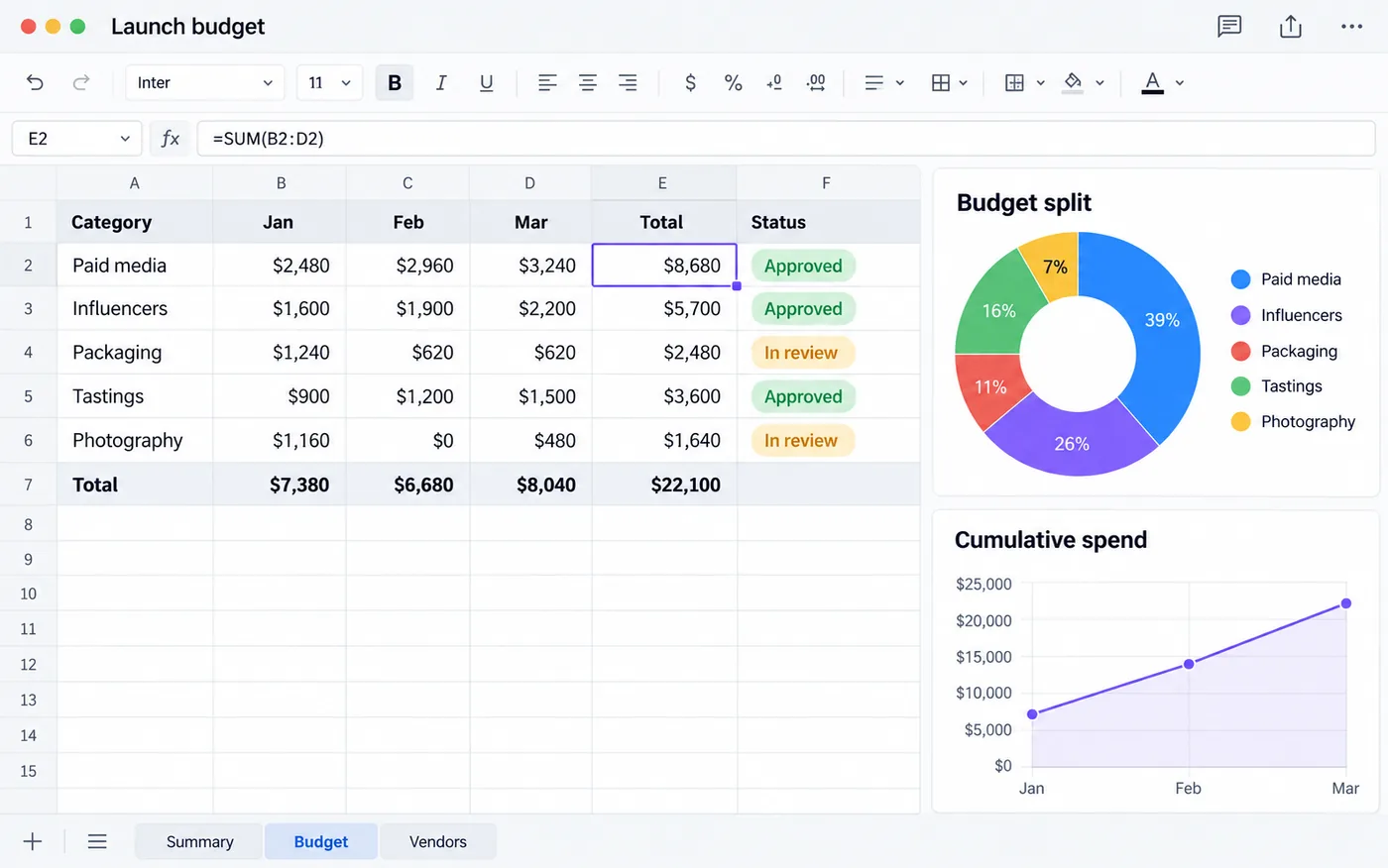
  3. The agent creates a document, a spreadsheet and a presentation, which open in the file panel.
  4. The agent uses the computer to code a 3D island racing game and shows the preview.
  5. In the # aurora-launch room, someone calls @Assistant; the card goes from queued to done and the reply assigns the tasks.
  6. In a four-person meeting, the transcript runs live and the minutes are written with Summary, Decisions and Next steps.

Use dozens of AI models with your team

Text, image and video models in your company account. Every use spends plan credits, and light models spend fewer.

Chat with light models every day

Fewer credits per reply, for routine conversations.

  • Light

    GPT-6 Luna

    OpenAI Text

  • Light

    MiMo-V2.6-Flash

    Xiaomi Text

  • Light

    GLM 5.3 Flash

    Z.ai Text

  • Light

    Claude Haiku 5.5

    Anthropic Text

Use premium models for demanding tasks

Text, image and video, with more credits per use.

  • Premium

    Claude Opus 5.5

    Anthropic Text

  • Premium

    Claude Sonnet 5.5

    Anthropic Text

  • Premium

    GPT-6.1 Sol

    OpenAI Text

  • Premium

    Gemini 4 Argon

    Google Text

  • Premium

    Gemini 3.8 Flash

    Google Text

  • Premium

    GLM 5.3

    Z.ai Text

  • Premium

    DeepSeek V4.1 Flash

    DeepSeek Text

  • Premium

    FLUX

    Black Forest Labs Image

  • Premium

    GPT-5.4 Image 2

    OpenAI Image

  • Premium

    Grok Imagine Video

    xAI Video

The catalog changes over time. Names and trademarks belong to their respective owners.

Generate documents, presentations and spreadsheets

Ask in one sentence and hand your team a file ready to review, with the numbers in place.

aurora-iced-plan.docxSavedExport Word (.docx)
Document "Launch plan for the Aurora Iced line" with an executive summary, an iced coffee photo, quarterly goals and a projected sales chart

Write the Aurora Iced launch plan for the leadership team, with quarterly goals and budget.

Document ready

  • Format headings, lists and tables

    Add quotes too, like in a word processor.

  • Export to .docx

    Take the document to Word or export it as HTML.

  • Adjust it your way

    Edit right in the editor or ask for changes in the chat.

Generate images and videos

Generate photos and videos in different formats from a single request, to use wherever your company needs them. Each generation uses plan credits, with an estimate first.

Smiling man holding a small white robot that waves, on an orange background

Prompt: “A photo of me holding a robot, orange background”

Model: GPT-5.4 Image 2 Image

Video frame: woman in a white linen dress walks along a turquoise beach at sunset, looking back, with a straw hat in her hand

Prompt: “Woman in a white linen dress walks along the sand at sunset and looks back, straw hat in hand”

Model: Grok Imagine Video Video · 0:08

Video frame: red-caped heroine on top of a ruined building facing a giant robot during a lightning storm

Prompt: “Movie scene: red-caped heroine faces a giant robot over a flooded city, lightning storm”

Model: Grok Imagine Video Video · 0:10

Create websites, apps and games without coding

In SquadOS Studio, describe what you want or start from a ready-made template. The AI builds the preview and updates the project as you ask in the conversation.

Create a website for Tide Studio, a yoga studio facing the ocean
PreviewTide Studio
Preview of the Tide Studio website, a yoga studio facing the ocean, with the headline "Breathe. Move. Begin again." and a Book a free class button.
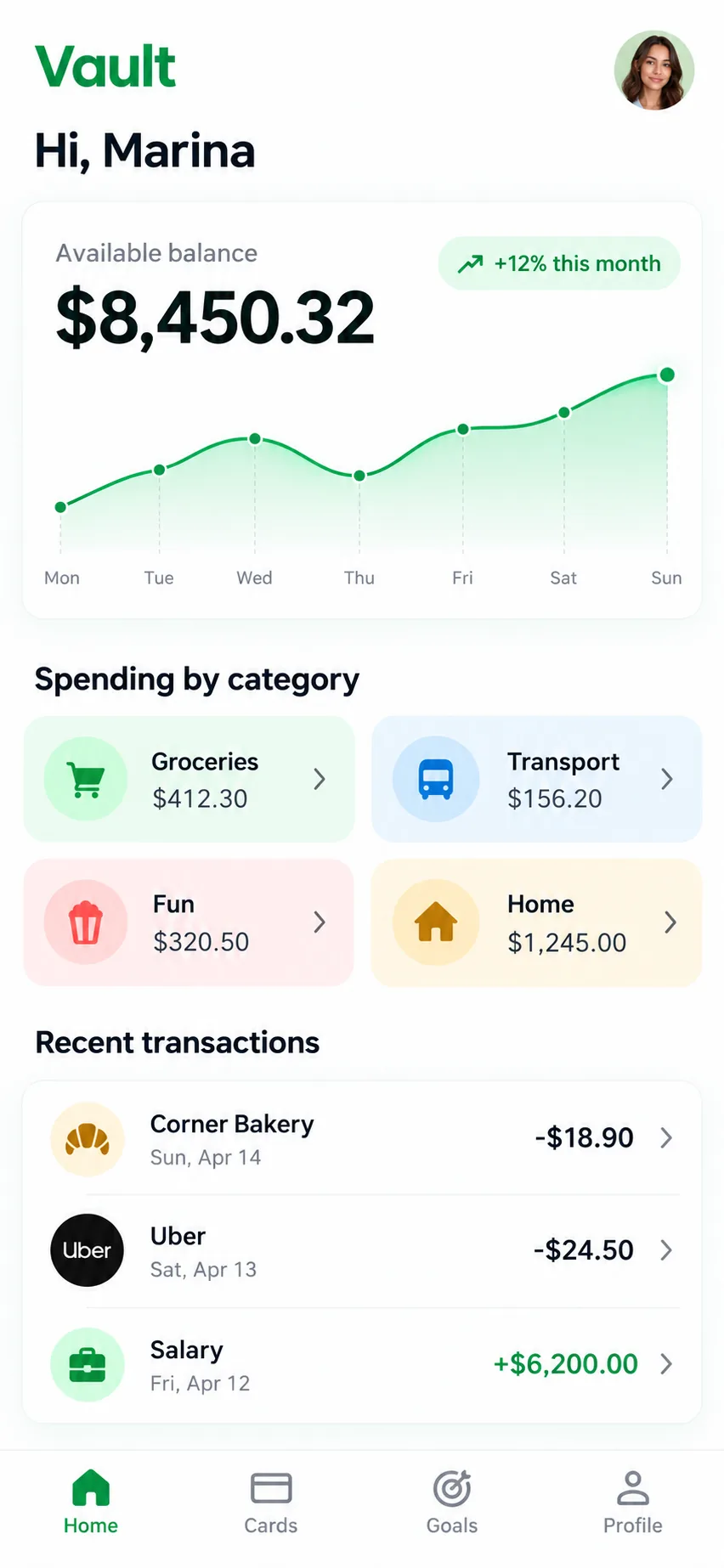
Preview of the Vault personal finance app on a phone, with balance, weekly chart, spending by category and recent transactions.
3D racing game on a tropical island: a white robot drives a kart along a sandy track with coins, near a lighthouse and a volcano.

Send automated emails with AI

AgentMaker builds the sequence and writes the email; SquadOS sends it to your list, with no separate sending tool. Each email uses 0.35 plan credit.

  • Sequences

    Trigger, wait, condition and send in one flow. Ask AgentMaker and review before saving.

  • Campaigns

    Send to a whole list from a sender on your verified domain.

  • Unlimited contacts

    The plan does not charge per stored contact; each send uses credits.

  • Reports

    See deliveries, opens, clicks and unsubscribes per email and per step.

Compare the cost of 40k emails a month

In SquadOS, sending uses your plan credits, with no separate email tool. At this volume, 1,000 credits are left for AI and other features.

SquadOS
14,000 credits
14,000 of 15,000 credits
0.35 credit per email. 1,000 of the Business plan's 15,000 credits are left.
Business plan: R$99.40/month*
Brevo Starter
R$225/month
Entry plan, separate tool
Brevo Standard
R$374/month
With automations, separate tool
ActiveCampaign
R$520/month
Example budget

References for 40,000 sends a month, checked on Oct 24, 2026. Brevo Starter and Standard: BRL rate card. ActiveCampaign: example budget that changes with plan and contact count. In SquadOS, AI generation and other features use the credits that are left. *R$99.40/month with 30% off for the first 12 months; then R$142/month.

A team laughing in a meeting room overlooking Sugarloaf Mountain while a colleague points at the screen

Call AI into your team’s rooms and meetings

Call an agent in a room conversation and get the task done in the thread. In meetings, the transcript becomes minutes. Rooms and meetings are part of the Business plan.

Connect with the apps you already use

More than 80 integrations and 12 channels. Your agents look up, create and update data in the tools you use every day, from WhatsApp to Google Sheets.

  • HubSpot
  • Telegram , Telegram bot
  • WhatsApp , Official (Cloud API) and QR Code
  • Instagram
  • Gmail
  • Google Sheets
  • Slack , Slack and Slackbot
  • Notion
  • Zendesk
  • Mailchimp
  • LinkedIn
  • Salesforce
  • Email , IMAP/SMTP inbox
  • Discord , Discord and Discord Bot
  • ActiveCampaign
  • Facebook
  • Microsoft Teams
  • Freshdesk
  • Resend
  • YouTube
  • Z-API , WhatsApp with your own account
  • Postmark
  • Reddit
  • Meta Ads
  • Website widget , Chat bubble on your website
  • UAZAPI , WhatsApp with your own instance
  • Google Ads
  • Mailcheck
  • Evolution API , WhatsApp with your own instance
  • Public page , Chat with its own address
  • API , REST endpoint
  • Google Calendar
  • Figma
  • ClickUp , ClickUp and ClickUp MCP
  • Google Drive
  • Canva , Canva and Canva MCP
  • Zoom
  • Airtable
  • Calendly , Calendly and Calendly MCP
  • monday.com , Monday and Monday MCP
  • Google Docs
  • Miro
  • Linear , Linear and Linear MCP
  • OneDrive
  • Cal.com
  • Jira
  • Gamma
  • Fireflies
  • Google Tasks
  • Jotform
  • Fathom
  • Google Slides
  • Formbricks
  • Cloudinary
  • HeyGen
  • remove.bg
  • Higgsfield , Higgsfield MCP
  • ElevenLabs
  • OpenAI
  • GitHub
  • Gemini
  • Supabase
  • Google Analytics
  • Hugging Face
  • Make
  • Tavily , Tavily and Tavily MCP
  • PostHog
  • Postman
  • Google Maps
  • Fal.ai
  • Mixpanel
  • Apify , Apify and Apify MCP
  • Exa
  • Metabase
  • Firecrawl
  • Replicate
  • Google Search Console
  • Prisma
  • Baserow
  • OpenWeather , OpenWeather API and OpenWeatherMap
  • NocoDB
  • Context7 , Context7 MCP
  • Bubble
  • PhantomBuster
  • Softr
  • Parsehub
  • Backendless
See all connectors

Bring your team’s tools into one plan

In this example, AI, meetings, chat, CRM and email for 5 people add up to R$2,010.49 a month. Business costs R$99.40 a month for the first 12 months, with no user limit.

8 separate subscriptions R$2,010.49

Separate subscriptions

Monthly prices as of Oct 24, 2026

Monthly total R$2,010.49

Exchange rate: R$5 per US$1 · ≈ estimate

Individual Plus

For one person. Does not include rooms, meetings or service automations.

was R$14230% off for 12 months

R$99.40 /month

30% off for 12 months, then R$142/month. Billed in Brazilian reais.

Subscribe to Individual Plus

SQUADOS30OFF coupon already applied at checkout

10,000 credits a month

  • Unlimited personal chat on selected models, marked with ∞
  • AI image, video and file creation
  • One account for your individual use
Explore SquadOS for you

Prefer to start small? Start with the Free plan and 100 credits a month

Third-party monthly prices checked on Oct 24, 2026 on the official sites (linked on the receipt), excluding taxes and promotions. R$5 per US$1 is an assumption, not a live rate. Zoom and Slack include 5 seats. CRM (R$500) and ActiveCampaign (R$520) are estimated budgets, marked with ≈; ActiveCampaign pricing depends on plan and contact count. This compares budgets: each product has its own capabilities and terms.

Money-back guarantee · 7 days · Money-back guarantee · 7 days · 7 days

Subscribe with a 7-day guarantee

Use SquadOS for up to 7 days after subscribing. If it is not right for you, request cancellation and a refund through the contact page.

  1. Subscribe
  2. Use it for up to 7 days
  3. Request a refund
Go to the contact page

Frequently asked questions

Can't find your answer? The SquadOS team can help with plans, credits and features.

Talk to the team
How many people can use the Business plan?

There is no user limit: invite the whole team. The 15,000 monthly credits are shared by the organization, and agents and contacts have no quantity limit either.

How do agents work in rooms?

Rooms bring people and agents together. Type @ and the agent name in a message: it works in the thread and shows its progress (queued, working, waiting for you, done) and the credits used.

How do meetings work?

Create a meeting link for up to 30 participants, or up to 100 in Stage mode. With transcription on, participants are notified and the minutes come out with Summary, Decisions, Action items and Open questions, posted in the room. Transcription and minutes use credits.

Can I serve customers on WhatsApp and Instagram?

Yes. Connect WhatsApp through the official Meta API or providers such as Z-API, UAZAPI and Evolution, and Instagram Direct from a Business account. Each inbox goes to an AI agent or to the team, who take over the conversation when needed. Team replies do not use credits; Meta fees, when they apply, are charged separately.

How much does it cost to send emails with SquadOS?

Each email accepted for sending uses 0.35 credit. 40,000 emails use 14,000 of the 15,000 monthly credits. Emails go out from your verified domain and respect unsubscribes and bounces.

What does the SquadOS CRM organize?

Conversations, contacts, tags, internal notes and lists, with email as a conversation channel. You import contacts from CSV and use lists in automations and email campaigns.

How does the company use credits?

Agents, automations, emails, meeting transcription and file, image and video creation use the organization credits. Business has no unlimited use: lighter models use fewer credits and premium models use more. Credits renew every month.

Can Studio use the company's credits?

Yes. Sign in to Studio with your SquadOS account and choose the organization: tasks done through that connection use its credits. You can also sign in with your ChatGPT or Claude subscription.

Can I cancel at any time?

Yes. In Manage Subscription, you cancel through the billing portal, and the plan stays active until the end of the period you already paid for. After the 12 discounted months, the subscription continues at R$142/month unless you cancel.

How does the 7-day guarantee work?

You have 7 days after subscribing to try SquadOS. If it is not right for you, write to the team through the contact page within that period and request cancellation and a refund of your subscription.