

Skip to content
SquadOS
Theme
Log in

Answer customers on WhatsApp and Instagram with AI

Connect your WhatsApp number or Instagram Business account to an agent with your company knowledge. It replies, books appointments through your connected calendar and hands the conversation to your team when needed.

  • Official WhatsApp (Cloud API)
  • Instagram Direct
  • Your team can step in anytime
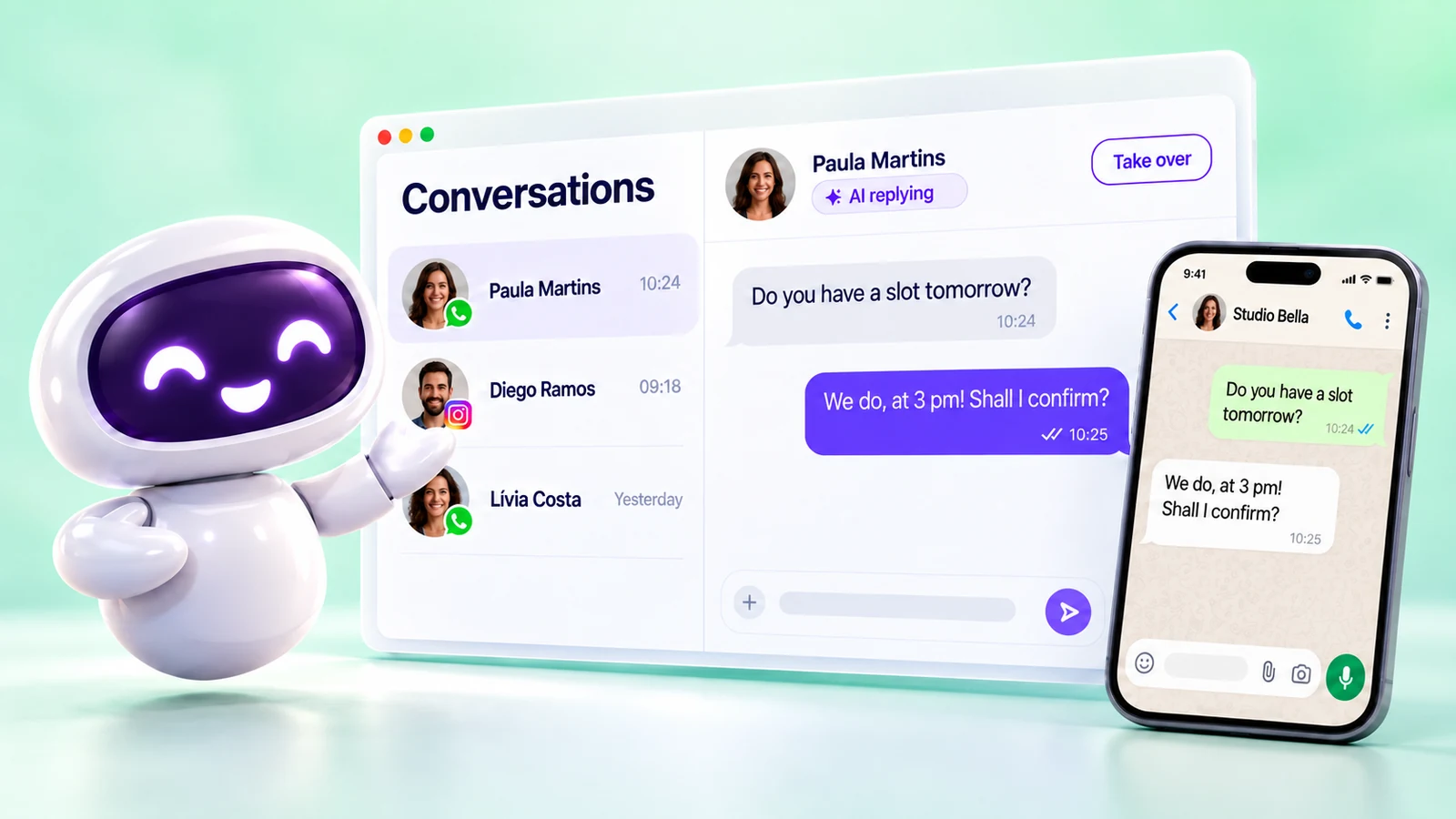
SquadOS mascot next to the SquadOS Conversations screen, with the WhatsApp and Instagram inbox, the AI replying pill and the Take over button, and a phone showing the customer’s own WhatsApp messages.

What is a WhatsApp and Instagram agent?

WhatsApp and Instagram bubbles flowing into one unified inbox and routed to the SquadOS mascot, while a teammate takes over one of the conversations.

It is an AI agent linked to an inbox. Each WhatsApp number or Instagram account becomes an inbox, and you choose whether it goes to an AI agent or to Human support.

The agent replies with the prompt, knowledge and tools you set up. Your team follows everything in Conversations and can step in at any time; a service schedule switches between AI and people by time of day.

WhatsApp your way
Official through Meta’s Cloud API, Z‑API, UAZAPI, Evolution or QR Code for testing.
Instagram Direct
Direct messages from a Business account, in the same inbox.
Service schedule
Time slots switch the owner between your team and the agents.
Knowledge and AutoLearn
Answers from your documents; unanswered questions become improvements.

How to serve customers on WhatsApp and Instagram

Prepare the agent, connect the channel and follow the conversations. Highlighted names are the buttons and screens of the product.

  1. Step 1: Prepare the agent

    Create the agent in Agents, link the base with products, prices and policies in Knowledge and test it with real questions.

  2. Step 2: Connect the inbox

    In Inboxes, select Connect inbox and choose official WhatsApp, Instagram Direct or another channel.

  3. Step 3: Choose the destination and hours

    Set AI agent as the default destination. With the schedule, the agent covers after hours and Human support covers business hours.

  4. Step 4: Follow it in Conversations

    See what the AI is handling in the AI view. To join the conversation, use Claim; then hand it back to the agent.

How to get WhatsApp and Instagram agents

Inboxes and conversations are part of every plan. AI replies on channels use credits, including on Individual Plus.

Availability by plan

  • Free

    Included

    Connect channels and use 100 monthly credits for replies.

  • Individual Plus

    Included

    10,000 monthly credits. The personal chat ∞ does not apply to channels.

  • Business

    Included

    15,000 monthly credits and your whole team serving customers, with no user limit.

Where to use it

  • Web : Available. Connect and follow in the dashboard.
  • Studio Not available Channels live on the Web.

Start in 3 steps

  1. Create your account
  2. Choose your plan
  3. Connect the channel

The Free plan comes with 100 monthly credits to try SquadOS. In the dashboard, open Inboxes and select Connect inbox.

The channel may have its own cost outside SquadOS, such as Meta fees on the official WhatsApp API.

Compare SquadOS plans

Business costs R$99.40 a month for the first 12 months, with no user limit. On the receipt, AI, meetings, chat, CRM and email for 5 people add up to R$2,010.49 a month.

8 separate subscriptions R$2,010.49

Separate subscriptions

Monthly prices as of Oct 24, 2026

Monthly total R$2,010.49

Exchange rate: R$5 per US$1 · ≈ estimate

Individual Plus

For one person. Does not include rooms, meetings or service automations.

was R$14230% off for 12 months

R$99.40 /month

30% off for 12 months, then R$142/month. Billed in Brazilian reais.

Subscribe to Individual Plus

SQUADOS30OFF coupon already applied at checkout

10,000 credits a month

  • Unlimited personal chat on selected models, marked with ∞
  • AI image, video and file creation
  • One account for your individual use
Explore SquadOS for you

Prefer to start small? Start with the Free plan and 100 credits a month

Third-party monthly prices checked on Oct 24, 2026 on the official sites (linked on the receipt), excluding taxes and promotions. R$5 per US$1 is an assumption, not a live rate. Zoom and Slack include 5 seats. CRM (R$500) and ActiveCampaign (R$520) are estimated budgets, marked with ≈; ActiveCampaign pricing depends on plan and contact count. This compares budgets: each product has its own capabilities and terms.

Money-back guarantee · 7 days · Money-back guarantee · 7 days · 7 days

Subscribe with a 7-day guarantee

Use SquadOS for up to 7 days after subscribing. If it is not right for you, request cancellation and a refund through the contact page.

  1. Subscribe
  2. Use it for up to 7 days
  3. Request a refund
Go to the contact page